Sharing#
Drive allows collaborators to share files with external parties who do not have an account or access to the space.
Share individual files#
Sharing of individual files is based on share-links — tokenised URLs that grant read-only access without requiring authentication. A share-link references one or more files within a space. The link can be sent to anyone; opening it grants read-only access to exactly the files included in the share-link, nothing else.
Example: https://example.teambeam.de/download/files/znd4b2zslueo57vv
Creating a share-link#
A collaborator with write privilege can create a share-link by selecting one or more files from the space. Directories cannot be shared — only individual files. Trashed files cannot be added to a share-link.
A share-link can be modified after creation: files can be added or removed. If all files are removed (for example, because they were deleted from the space), the share-link is automatically deleted.
A share-link may carry an optional free-text label — a collaborator-facing annotation that helps tell share-links apart. The label is not exposed to guests.
The number of files in a single share-link is capped by the server (shareLinkFilesLimit, readable from GET /api/drive/v3/environment). Exceeding the limit returns 403 SHARELINK_EXCEEDS_LIMITS.
Expiration#
A share-link can optionally have an expiration date. After this date, anyone opening the link will receive an error instead of file access. Expired share-links are automatically deleted by a scheduled job — once the expiry has passed, the share-link and all its file references are removed.
Permissions#
| Action | Required privilege |
|---|---|
| View share-links and see which files are shared | Read |
| Create, modify, or delete share-links | Write |
What guests can access#
A person opening a share-link (the guest) can:
- Download or stream the shared files
- View file metadata (name, size, MIME type)
- View file previews and thumbnails
- Download all shared files as a ZIP archive
- View the space avatar
- See the share-link's expiration date (
expiresAt), so the viewer can communicate when the link will stop working
A guest cannot access the space itself, its collaborator list, events, or any files not included in the share-link. Guests have no write access. The identity of the collaborator who created the share-link (createdBy) and the share-link's label are not exposed to guests.
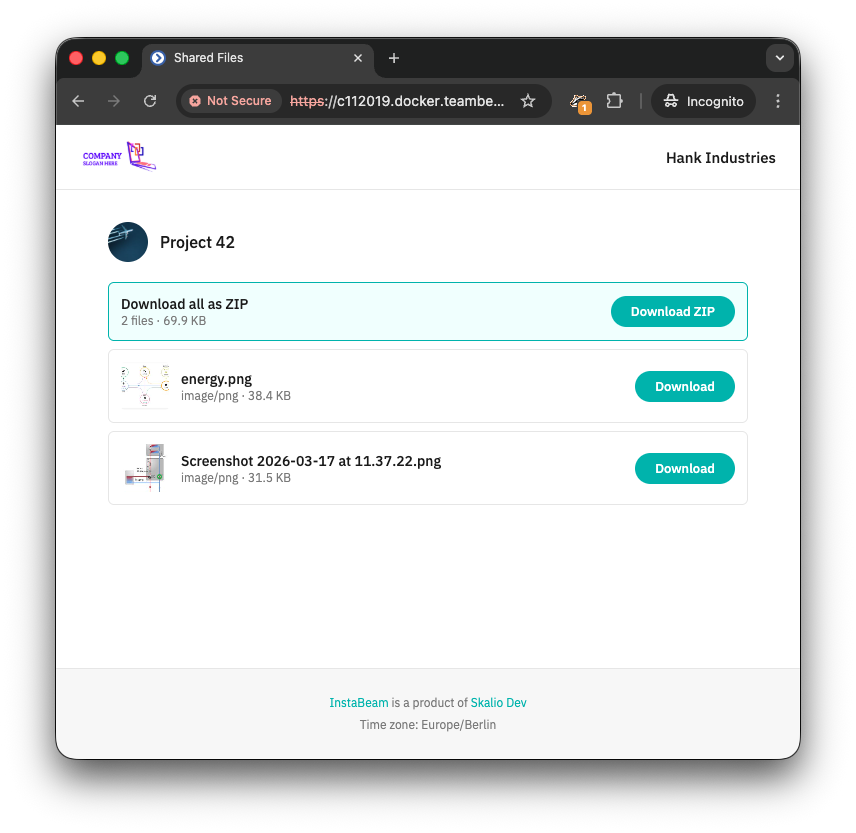
Guest authentication#
Opening a share-link URL issues a short-lived guest token. This token is set as an HttpOnly cookie scoped to the share-link path, so the browser sends it automatically on subsequent requests (file downloads, previews, ZIP). No Authorization header is needed.
The guest token has a limited validity controlled by the server. Clients should monitor the token's exp claim and re-resolve the share-link before expiry to obtain a fresh token.
Public URL#
Each share-link includes a publicUrl — a fully qualified URL pointing to a viewer page for the shared files. This is the URL that collaborators copy and distribute to external recipients.
File metadata#
When a file is referenced by one or more share-links, the file's metadata includes a shareLinkUids array listing the UIDs of those share-links. This allows collaborators to see at a glance which files are currently shared. The field is omitted when the file is not part of any share-link.
Audit trail#
Each share-link tracks who created it (createdBy), when it was created (createdAt), when it was last modified (updatedAt), and when it was last accessed by a guest (lastAccessedAt). Creating, modifying, or deleting a share-link generates space events visible to all collaborators.
If the collaborator who created a share-link is removed from the system, createdBy is cleared to null. The share-link itself remains active — guests continue to have access.
Lifecycle with file deletion#
When a file is deleted or trashed, it is automatically removed from any share-links that reference it. If this leaves a share-link with no remaining files, the share-link itself is deleted. Similarly, when a space is deleted, all its share-links are removed.
Publish an entire space#
Space publishing makes an entire space accessible to anyone with its URL, without requiring a Skalio ID account. Where share-links grant access to individual files, publishing grants read-only access to the full directory tree of a space.
A published space carries a single internal guest collaborator that represents anonymous access. This collaborator is never surfaced in the collaborator list — other collaborators simply see a published: true flag on the space DTO.
Publishing and unpublishing#
A space admin publishes a space by calling POST /api/drive/v3/{spaceUid}/publish. This is idempotent — publishing an already-published space returns 204 No Content with no side effects.
Unpublishing is done with DELETE /api/drive/v3/{spaceUid}/publish. This too is idempotent.
Publishing a space emits a SPACE_PUBLISHED event visible to all collaborators. Unpublishing emits SPACE_UNPUBLISHED. Neither action emits COLLABORATOR_CREATED or COLLABORATOR_REMOVED.
Permissions#
| Action | Required privilege |
|---|---|
See whether a space is published (published field on the space DTO) |
Read |
| Publish or unpublish a space | Admin |
View publish status and last-access telemetry (GET /publish) |
Admin |
Constraints#
Publishing and the secure flag are mutually exclusive. A secure space requires MFA, which a guest token cannot satisfy.
- Attempting to publish a
secure = truespace returns403 SECURE_SPACE_CANNOT_BE_PUBLISHED. - Attempting to set
secure = trueon a published space returns403 PUBLISHED_SPACE_CANNOT_BE_SECURED. The admin must unpublish the space first.
Public URL#
A published space includes a publicUrl field — a fully qualified URL pointing to the viewer for that space. This is the URL collaborators distribute to external recipients.
Example: https://example.teambeam.de/share/space/abc123
Guest authentication#
Navigating to the public URL causes the viewer to call POST /api/drive/v3/{spaceUid}/access/guest. This unauthenticated endpoint returns a short-lived JWT for published spaces (404 for unpublished or deleted spaces). The token can also be set as an HttpOnly cookie using the ?cookie=true query parameter.
The guest token is a standard access token with privilege = guest. It is accepted by the regular /api/drive/v3/{spaceUid}/... endpoints without modification to the authentication layer. Clients should monitor the token's exp claim and re-call the endpoint before expiry to obtain a fresh token.
Each successful token issuance records a lastAccess timestamp on the guest collaborator, visible to admins via GET /api/drive/v3/{spaceUid}/publish.
What guests can access#
A guest can:
- Navigate the space's directory tree
- Download or stream files
- View file metadata (name, size, MIME type)
- View file previews and thumbnails
- Download files as a ZIP archive
- View the space avatar
A guest cannot access collaborators, invitations, share-links, the event stream, or trash. The space-details payload returned to a guest includes empty arrays for collaborators, invitations, shareLinks, and trash; all other space-level fields are populated normally.
All write and admin operations (uploading, creating collaborators, publishing/unpublishing) are rejected for a guest token.
Guest traffic is rate-limited by a separate leaky-bucket from that used for authenticated collaborators, so guest sessions cannot affect the rate-limit budget of human collaborators.
Publish status#
GET /api/drive/v3/{spaceUid}/publish returns a PublishStatus object for admins:
| Field | Description |
|---|---|
publishedAt |
When the space was published (guest collaborator creation timestamp) |
lastAccessedAt |
When a guest token was last issued; absent before the first access |
publicUrl |
The fully qualified public URL for the space |
Events#
Two event types relate to space publishing:
| Event | Trigger |
|---|---|
SPACE_PUBLISHED |
A space transitions from unpublished to published |
SPACE_UNPUBLISHED |
A space transitions from published to unpublished |
Both events carry the space UID and the acting principal. Collaborators with immediate or digest notifications enabled are notified when a space is published or unpublished; the internal guest collaborator itself is never a notification recipient.
Isolated read access#
A space administrator can invite "named guest" collaborators to the space by granting them the guest-privilege. A guest collaborator must authenticate before accessing the space.
These guests have a reduced view, limited to the space itself plus its files. Guests cannot access files in trash, and they cannot see other collaborators or invitations. Since access is authenticated, the standard client is used.
The named guests are however seen by other collaborators with privilege read or higher.
A guest can be promoted to normal collaborator, and vice versa.